
User Manual
Sensor Bio V2
Setup, pairing, charging, care, troubleshooting, and regulatory information for your Sensor Bio Band.
Quick Start Guide
Turning On
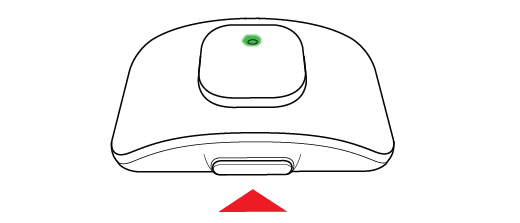
Hold the side button for 4 seconds until the LED turns green.
Turning Off
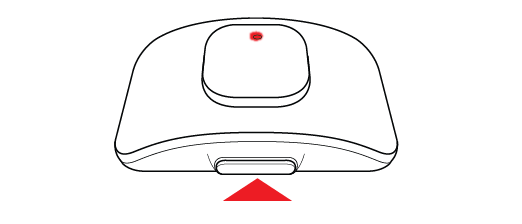
Hold the side button for 4 seconds until the LED turns red.
Charging
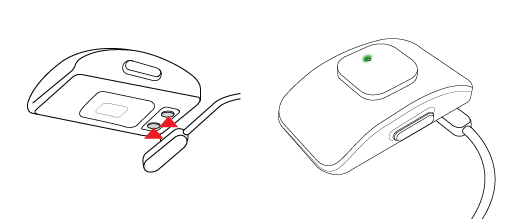
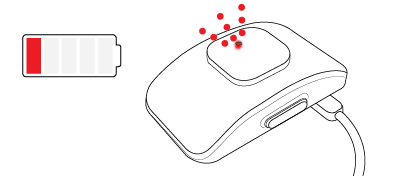
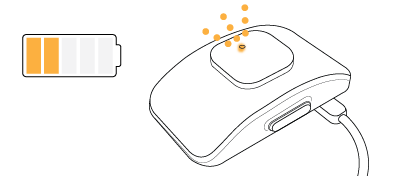
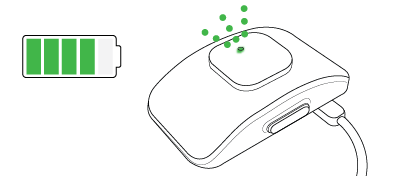
The LED will fade in and out slowly while charging.
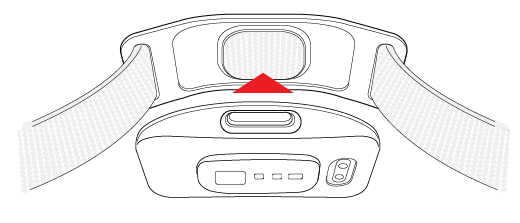
Attaching Your Strap
Align the module and strap using the double circles, then press firmly until the module sits flush and snaps secure.
Getting Started
Device Overview
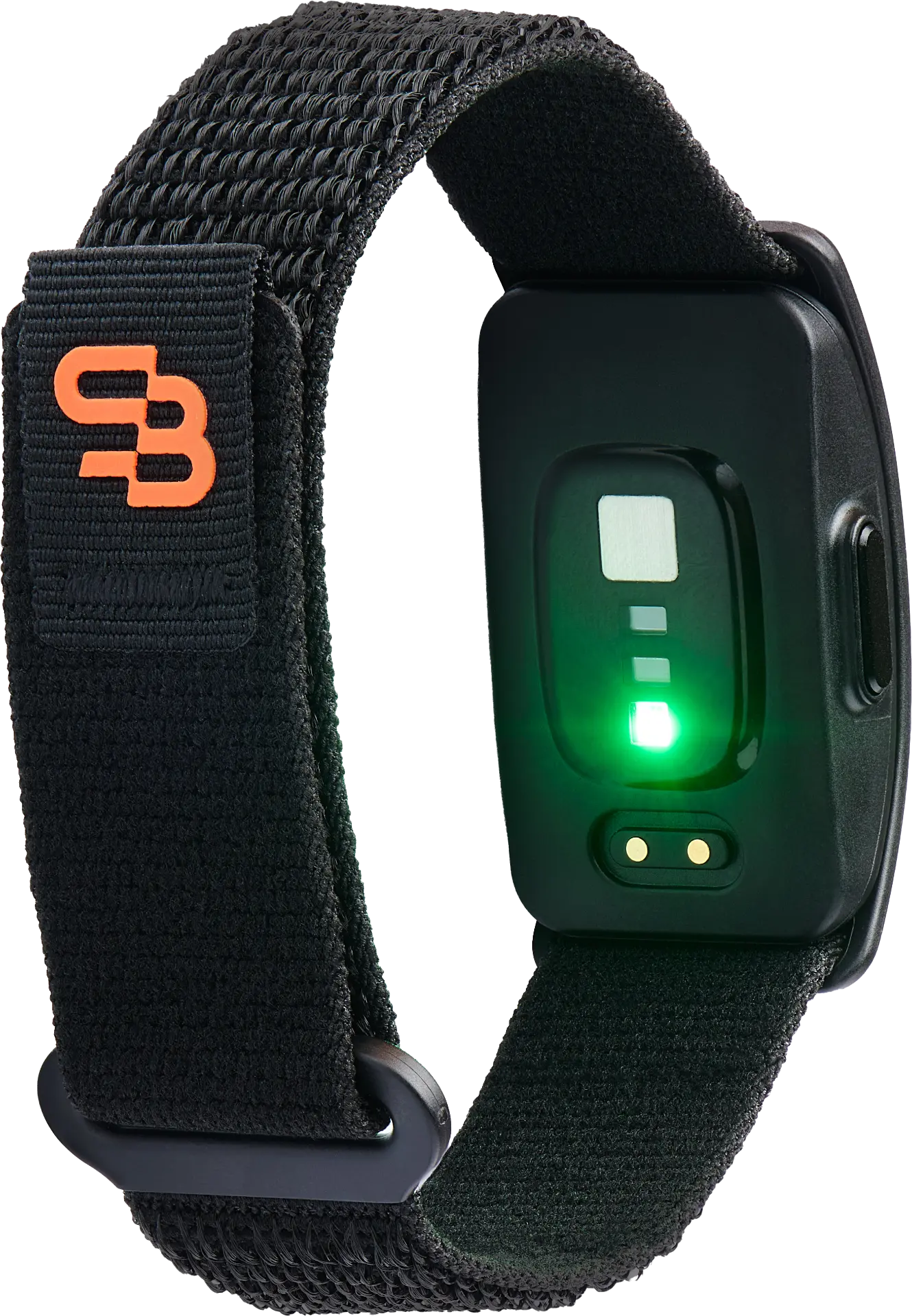
The Sensor Bio Band includes:
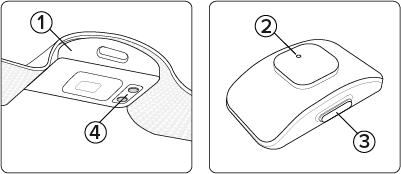
- Sensor Module — Collects physiological and motion data when worn.
- LED Light — Indicates charging status and device power status.
- Side Button — Used to power the device on and off.
- Charging Pins — Used to connect the magnetic charging cable.
Charging Time (0–100%)
Charging behavior is non-linear. Like charging your phone, the Sensor Bio Band typically charges faster at lower battery levels and slows as it approaches full capacity to help preserve long-term battery health.
In many cases, the device may reach approximately 50% charge within 30–45 minutes, while a full charge may take up to 3 hours, depending on power source, battery level, and environmental conditions.
Charging Recommendations:
- Partial charging is safe and encouraged.
- The device does not need to be fully depleted before charging.
- Use a standard, reliable power source (USB-C port or wall adapter).
- Avoid charging in extreme heat, direct sunlight, or wet environments.
Charging
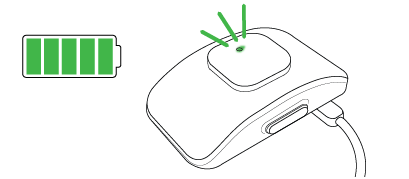
LED Status Color — How to Know When It Is Fully Charged
While charging, the LED will fade in and out slowly. Once fully charged, the LED will turn solid green. Disconnect from the charger once the device is fully charged.
Pairing & Setup
Download the Sensor Bio App

Available on the App Store and Google Play.


App Store is a service mark for Apple Inc. Google Play, the Google Play logo and Android are trademarks of Google Inc.
Activating Your Device
Check your email for your activation code. Enter it in the app to activate your device, then follow onboarding to create your account and pair your device.
Pairing via Bluetooth
Make sure your device is charged or charging and near your phone. Then start pairing from one of the following:
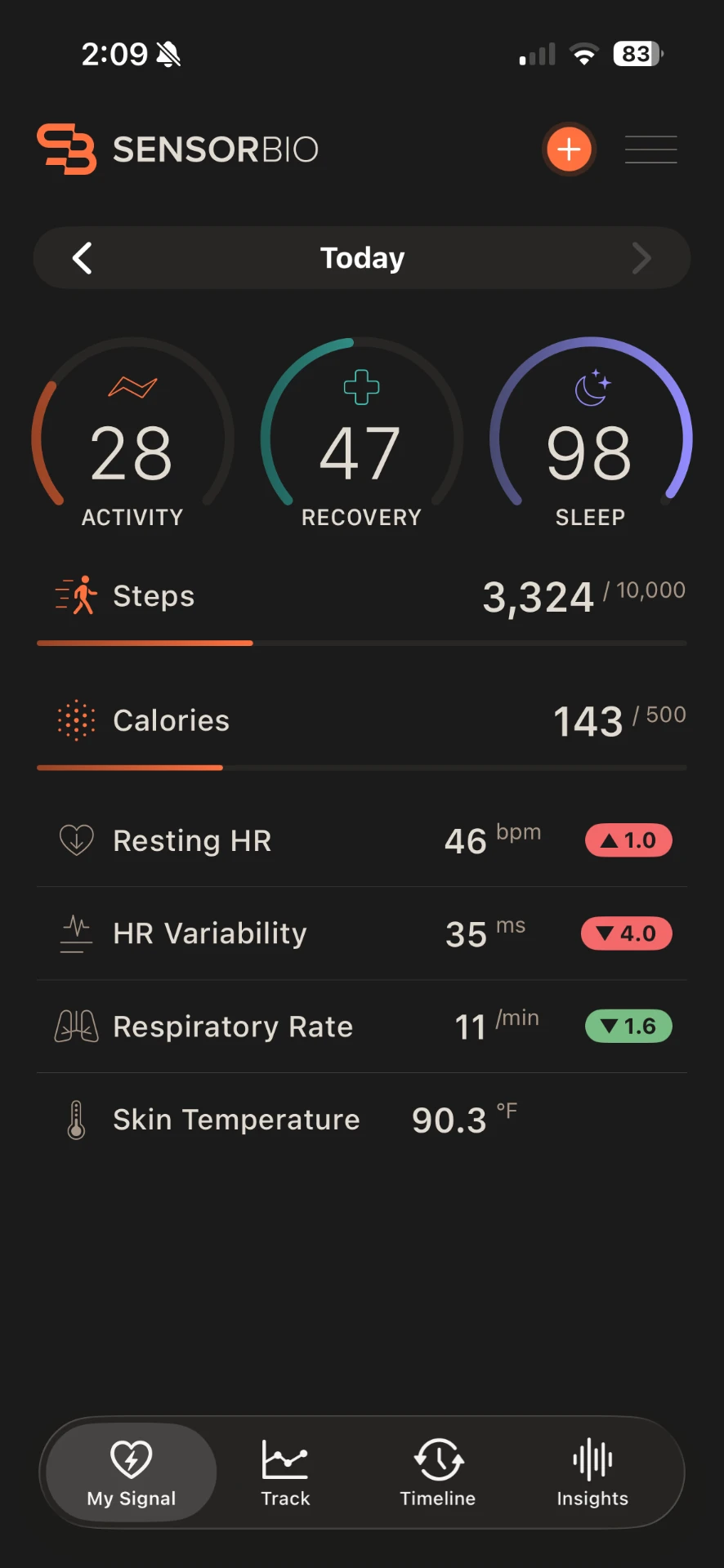
Pair on My Signal Page
On the My Signal page, tap the orange + icon in the top right.
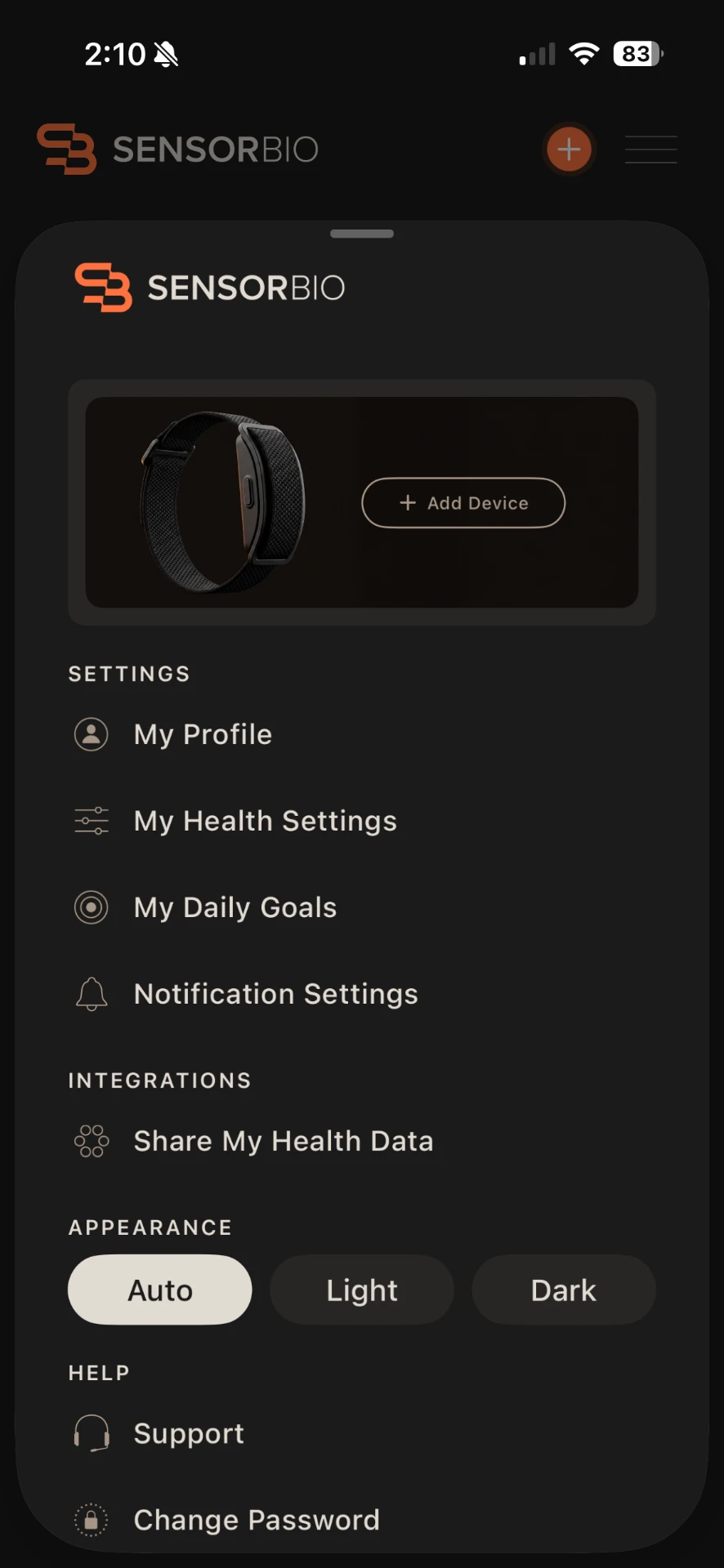
Pair on Settings Page
Open the menu (top right) and select Pair Device at the top of Settings.
Then:
- Select your device — tap it when it appears on screen with its serial number.
- Confirm pairing — when prompted, press the button on the side of the device.
Wearing Your Band
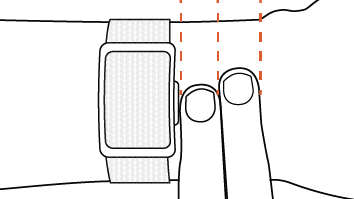
Wear your device two fingers above your wrist bone for the best data quality. Ensure a snug but comfortable fit.
Using Your Device
Hardware
- Power On: Press and hold the side button for 4 seconds until the LED turns green.
- Power Off: Press and hold the side button for 4 seconds until the LED turns red.
Using the Side Button
- Long Press: Power On / Power Off.
- Single Press: If supported in your firmware/app version, a single press may wake the device or show a brief status light.
Syncing Data
Open the Sensor Bio app regularly to sync and offload data from the band.
Recommended: Open the app at least once per day to ensure data is saved and available for review.
Understanding LED Light Patterns
| Pattern | Meaning |
|---|---|
| Fades in and out slowly (while plugged in) | Charging |
| Solid Green (while plugged in) | Fully Charged |
| Green (during power on) | Device powering on |
| Red (during power off) | Device powering off |
| Blue Blinking | Pairing Mode |
Care & Maintenance
Cleaning the Device
Wipe the sensor area with a soft, damp cloth after workouts or extended wear. Do not use harsh chemicals, abrasive cleaners, or submerge the device for cleaning.
Water Resistance
The Sensor Bio Band has an IP68 rating (water-resistant in fresh water up to 1 meter for 30 minutes). Avoid prolonged hot showers, saunas, steam rooms, and contact with soaps, shampoos, or chemicals, as these can degrade water resistance over time.
Battery Life Tips
Typical battery life is up to 7 days depending on usage (production mode). To maximize battery life:
- Sync regularly and avoid unnecessary continuous recordings.
- Keep firmware and the Sensor Bio app updated.
- Store the band partially charged if not used for extended periods.
Troubleshooting
Device Won't Charge
- Confirm the magnetic charger is aligned correctly with the charging pins.
- Try a different USB-C port or wall adapter.
- Inspect charging pins for debris and gently wipe with a dry, soft cloth.
- If the LED does not blink while plugged in, try a different cable/power source.
Resetting the Device
- Soft Reset: Power the device off, wait 10 seconds, then power it back on.
- Hard Reset / Factory Reset: Home Dashboard → Gear Icon → Sensor Bio Band → Reset
Device Won't Pair
- Ensure Bluetooth is enabled on your phone.
- Keep the band within a few feet of your phone.
- Close and reopen the Sensor Bio app.
- Power the band off, then back on, and try pairing again.
- If your phone previously paired to the device, try "Forget This Device" in Bluetooth settings, then re-pair from the Sensor Bio app.
Legal
Legal & Regulatory
Data Privacy
By using the Sensor Bio V2, you agree to our Privacy Policy and Terms of Service regarding the collection, use, and storage of your biometric and health data. For details, visit sensorbio.com/terms-and-conditions.
Battery and Disposal Information
This device contains a lithium-ion battery which must be disposed of separately from ordinary household waste.
FCC and ISED Compliance
This device (FCC ID: 2BTF2-S2001, IC: 34896-S2001) complies with Part 15 of the FCC Rules and ISED Canada license-exempt RSS-standard(s). Operation is subject to the following two conditions: (1) this device may not cause harmful interference, and (2) this device must accept any interference received, including interference that may cause undesired operation.
Note: This equipment has been tested and found to comply with the limits for a Class B digital device, pursuant to part 15 of the FCC Rules. These limits are designed to provide reasonable protection against harmful interference in a residential installation. This equipment generates, uses, and can radiate radio frequency energy and, if not installed and used in accordance with the instructions, may cause harmful interference to radio communications. However, there is no guarantee that interference will not occur in a particular installation. If this equipment does cause harmful interference to radio or television reception, which can be determined by turning the equipment off and on, the user is encouraged to try to correct the interference by one or more of the following measures:
- Reorient or relocate the receiving antenna.
- Increase the separation between the equipment and receiver.
- Connect the equipment into an outlet on a circuit different from that to which the receiver is connected.
- Consult the dealer or an experienced radio/TV technician for help.
12-Month Limited Warranty
This device is covered by a 12-month Limited Warranty. Any changes or modifications not expressly approved by the party responsible for compliance could void the user's authority to operate the equipment. For full details, please visit sensorbio.com/warranty. To obtain a hard copy of the Limited Warranty, write us at: 605 West 9th Street #1142 • Austin, TX 78701.


Sensor Bio, Inc.
605 West 9th Street #1142
Austin, TX 78701
Made in China
Model #: S2001
Included in the box:
- Sensor Bio V2
- Strap
- USB-C charging cable
IC: 34896-S2001
FCC ID: 2BTF2-S2001
© Copyright 2026 Sensor Bio, Inc.